Reslice your Garmin run – change any lap’s distance or duration
Melts down to Autolap gave you 1 km splits, but the splits you actually want – by climb, by 5 km block, by effort – are a different shape. Open your .fit file in ButterLaps, a free browser-based lap editor, and reslice it however the run unfolded: drag, add, and merge boundaries to change any lap’s distance or duration, and read each segment’s pace, heart rate, and power. No re-upload, nothing to install, no account, and your file never leaves your device. Reslice your run now →
Most of the time you don’t look at a run to fix it – you look at it to understand it. And the splits your watch happened to record are rarely the splits you actually want. Autolap gives you neat 1 km chunks, but the interesting questions don’t respect kilometre boundaries. How did the long climb compare to the descent that followed it? Did you fade over the back half? How even were your 5 km blocks in that marathon, really?
You don’t need to re-run anything or change a watch setting. Load the file you already have and reslice it however the run actually unfolded.
Ways to reslice
- By 5 km block. Load a marathon recorded with 1 km autolap and collapse it into 5 km segments to see your real pacing shape – negative split or slow fade – without a wall of forty tiny rows.
- By climb and descent. Drop a split at the bottom and top of a hill and read the climb as its own lap: its pace, its heart rate, its power. Then compare it to the descent you flew down afterward.
- By effort. Put a boundary where the surge started, or where you finally let go on the last mile. Some of the most useful splits are ones no autolap setting could ever produce.
- By cardiac drift. Split a steady long run down the middle to compare first-half and second-half heart rate at the same pace.
How it works
Drop your .fit into ButterLaps and your run plots on an interactive chart – pace, heart rate, power, cadence, and elevation. Double-click to add a split where you want it, drag markers to reposition, drop one onto its neighbour to merge. The lap table recalculates every split live – and previews a merge before you commit it, so the combined lap’s stats appear while you’re still dragging. Full walkthrough →
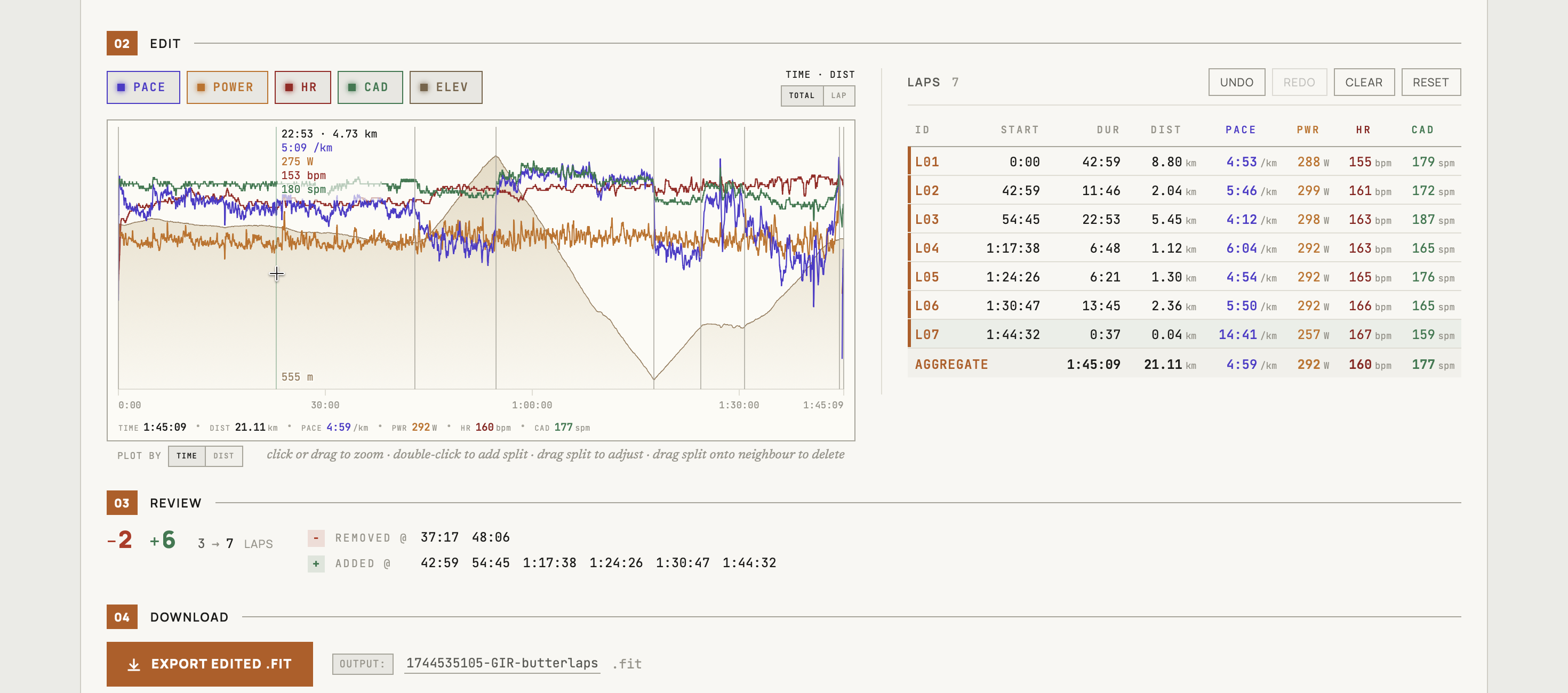
Change a lap’s distance or duration exactly
Every reslice is really an edit to a lap’s distance and duration – and you can be precise about it. As you drag a boundary, a tooltip follows the marker with live pace, distance, and time; switch the readout to LAP and it shows the running length of the lap you’re resizing, so you can release exactly on 1.00 km, on a round 5:00, or on any number you meant. The neighbouring lap absorbs the difference, and the table updates as you drag – a rep that logged 0.97 km reads 1.00 again before you ever download.
And you get that precision without ever typing a number. Older FIT editors make you key in record indices or timestamps and hope you picked the right row; here you just drag to the value and let go, watching it land. Because every edit is a gesture – drag, tap, double-click – the whole thing works the same under a thumb, so you can reslice a run on a phone or tablet as easily as at a desk.
Here’s the part that makes this safe to do casually: you never have to save anything. Reslicing is just a way of looking. Your original file on Garmin or Strava is untouched, your kudos and comments are untouched, and nothing is uploaded anywhere – the whole thing runs in your browser. Load a run, see it the way you meant to, close the tab. Export a corrected .fit only on the occasions you actually want one in hand.
And if you do export, only the lap records are rewritten – every other byte, including developer fields like Stryd’s, survives the round-trip unchanged. The rules ButterLaps edits by →
Reslicing works for running, cycling, walking, and hiking activities – multisport and swimming aren’t supported.
Free, in your browser, no account – made by one runner who got tired of read-only lap tables.